- Open Oracle dump with something like notepad++ or grap and do a find/replace for all the binary characters (these can be highlighted in notepad++) and replace them with something like a pipe character ("|")
- If you know the special characters that are not compatible with UTF-8, then do find/replace on these too now ... otherwise you can do this after running the copy command (step 5), since that will give an error for each non UTF-8-able line/character
- Open the piped file in Excel and replace with tabs. Tabs are the standard delimiter in Postgres and by saving out of Excel, you get a uniform number of columns for each record, thereby avoiding "missing data for column" when executing the "copy" command
- Create a table in Postgres with the number of columns seen in Excel, using generic data type such as text
- execute the copy command ... no delimiters param need be given, since it's tabs
COPY data FROM 'C:/temp/data.txt'
Showing posts with label sql. Show all posts
Showing posts with label sql. Show all posts
Tuesday, December 20, 2011
Importing Data Dump into Postgres
I needed to take four steps to import an Oracle binary dump into PostgreSQL

Monday, November 10, 2008
there are so many options with pear's db library for php, I sometimes forget the optimal code for getting a sql result as an array that I can easily use within php. The code below fully demonstrates connecting to and getting an associative array with an 'order by' field as the array key. This code is for a postgres rdms, but could easily be modified for mysql, sqlserver, etc. Parameters are in caps surrounded by '%' in the form %PARAMETER%.
require_once 'DB.php';
$dsn = "pgsql://%LOGIN%:%PASSWORD%@%HOST%/%DBNAME%";
$dbh =& DB::connect ($dsn);
if (PEAR::isError($dbh)) {
die($dbh->getMessage());
}
$dbh->setFetchMode(DB_FETCHMODE_ASSOC);
$res =& $dbh->getAssoc('%SQL STATEMENT, USE 'ORDER BY' TO DEFINE ARRAY KEY%');
if (PEAR::isError($res)) {
die($res->getMessage());
}
require_once 'DB.php';
$dsn = "pgsql://%LOGIN%:%PASSWORD%@%HOST%/%DBNAME%";
$dbh =& DB::connect ($dsn);
if (PEAR::isError($dbh)) {
die($dbh->getMessage());
}
$dbh->setFetchMode(DB_FETCHMODE_ASSOC);
$res =& $dbh->getAssoc('%SQL STATEMENT, USE 'ORDER BY' TO DEFINE ARRAY KEY%');
if (PEAR::isError($res)) {
die($res->getMessage());
}
Wednesday, September 17, 2008
To do a non-boolean conditional insert in SQL Server (the "where exists" clause is best for boolean), use the "where in" clause along with an inner join, in the following form:
INSERT INTO [Destination Table]([Destination Field1],[Destination Field2],[...])
SELECT [Origin Field1],[Origin Field2],[...]
FROM [Origin Table]
WHERE ([Test Field A, could be from origin] Not In (select [Test Field B] from
[Test Table, could be destination]));
INSERT INTO [Destination Table]([Destination Field1],[Destination Field2],[...])
SELECT [Origin Field1],[Origin Field2],[...]
FROM [Origin Table]
WHERE ([Test Field A, could be from origin] Not In (select [Test Field B] from
[Test Table, could be destination]));
Tuesday, August 5, 2008
Wednesday, June 25, 2008
postgres to mysql workflow
postgres to mysql workflow
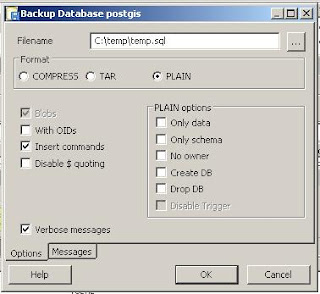
1. Export database from postgres to plain text sql. You should do this with the pgAdmin III tool by right clicking on the db you want to export and choosing "Backup ..." this will take you to the following screen, where you should select options as displayed below (notice the "Plain" and "Insert" options are checked):
2. Once you have exported your plaintext sql you must create tables in mysql into which you can insert your data. Do this by copying the CREATE statement appearing in the "SQL Pane" (after you have clicked/selected a table) in pgAdmin III into the MySQL query line and execute this. Do this for every table you want to import
3. Now run insert statements ... if you get errors, make sure the table structure of the new table is the same as your old table (and insert statement)
1. Export database from postgres to plain text sql. You should do this with the pgAdmin III tool by right clicking on the db you want to export and choosing "Backup ..." this will take you to the following screen, where you should select options as displayed below (notice the "Plain" and "Insert" options are checked):

2. Once you have exported your plaintext sql you must create tables in mysql into which you can insert your data. Do this by copying the CREATE statement appearing in the "SQL Pane" (after you have clicked/selected a table) in pgAdmin III into the MySQL query line and execute this. Do this for every table you want to import
3. Now run insert statements ... if you get errors, make sure the table structure of the new table is the same as your old table (and insert statement)
Wednesday, April 23, 2008
a common task I come across is the need to create a table of "distinct" records based upon "uniqueness" of values in a given field.
SELECT * INTO new_distinct_table FROM [old_non_distinct_table] WHERE [some_unique_field] In (SELECT Max([some_unique_field
]) FROM [old_non_distinct_table
] GROUP BY [non_unique_field_of_interest]);
I had earlier shown how to do an update query based on a field from another table in MS Access. Here is the syntax for postgres:
UPDATE to_table SET to_column = from_column from from_table where to_table.primary_key= from_table.foreign_key;
handy notes for this query:
UPDATE to_table SET to_column = from_column from from_table where to_table.primary_key= from_table.foreign_key;
handy notes for this query:
- append in postgres is || (double pipe)
- cast in postgres is like column_to_cast::type_to_cast
Wednesday, April 16, 2008
I often get tripped up doing an update of one table from fields in other table in access sql. i'm not sure if its because its different in other sql's, but in access it is required to do an inner join to the table which is being updated within the foreign update query.
Here is the general syntax in ms access sql to do one of these babies:
UPDATE [toTable] INNER JOIN [fromTable] ON [toTable].[primaryKey] = [fromTable].[foreignKey] SET [toTable].[toFieldUpdate]] = [fromTable].[fromFieldUpdate];
Here is the general syntax in ms access sql to do one of these babies:
UPDATE [toTable] INNER JOIN [fromTable] ON [toTable].[primaryKey] = [fromTable].[foreignKey] SET [toTable].[toFieldUpdate]] = [fromTable].[fromFieldUpdate];
Tuesday, April 1, 2008
MS Access Error on running "join/select into" query
Was getting the following error when running a "join/select into" query in MS Access
"Cannot open database ''. It may not be a database that your application recognizes, or the file may be corrupt."
I followed a bunch of suggestions I had found on the web ... especially this post which had suggested that I should reinstall Jet (which led me to this post which suggested I ultimately needed to reinstall Windows XP SP2 ... which in a slipstream install means that the entire OS needs to be reinstalled!)
Ultimately, I was able to solve this problem by simply saving the database in MS Access 2003 format (.mdb) from the 2007 format I had stored it in (.accdb). I was able to run the query from the mdb and then resaved back into Access 2007 format, where I am again able to re-rerun the query.
"Cannot open database ''. It may not be a database that your application recognizes, or the file may be corrupt."
I followed a bunch of suggestions I had found on the web ... especially this post which had suggested that I should reinstall Jet (which led me to this post which suggested I ultimately needed to reinstall Windows XP SP2 ... which in a slipstream install means that the entire OS needs to be reinstalled!)
Ultimately, I was able to solve this problem by simply saving the database in MS Access 2003 format (.mdb) from the 2007 format I had stored it in (.accdb). I was able to run the query from the mdb and then resaved back into Access 2007 format, where I am again able to re-rerun the query.
Subscribe to:
Posts (Atom)