In trying to make an ArcGIS server (9.3) caching service I was initially not seeing any option for the required "input layers" parameter in the cache manager (through service properties).
Afterwards I noticed that I was unable to preview the map service in ArcCatalog (though coordinates were visible at the bottom of that frame).
This issue was probably fixed by changing properties to include all arcgis server related accounts (used "everyone", just to make sure it was a permissions issue) as having read permissions for the individual shapefiles participating in the mxd I was trying to publish.
It may have also been fixed by not initially specifying a cache directory when creating the service through ArcCatalog, but probably not.
Wednesday, July 23, 2008

Wednesday, July 2, 2008
Arcmap geocoding error
Was getting the following error when trying to geocode, though I suspect it might come up whenever a feature class cannot be created which would have an invalid data table (dbf) associated with it:
Create Feature Class
There was an error trying to process this table.
Operation failed
Solution: Remove any unnecessary fields from the table
Create Feature Class
There was an error trying to process this table.
Operation failed
Solution: Remove any unnecessary fields from the table
Workflow: Access to Arcmap and Back
- export as .xls (with no formatting option)
- open w/ excel 2003 or earlier. press ctrl + A twice, do column autofit
- convert all double number fields to number w/ adequate number of sig digits (6 is good for decimal degrees)
- export as dbf
- import dbf to arcmap
- when creating shp via geoprocessing/etc name 6 chars/less and no special chars
- close arcmap
- import into access
Wednesday, June 25, 2008
postgres to mysql workflow
postgres to mysql workflow
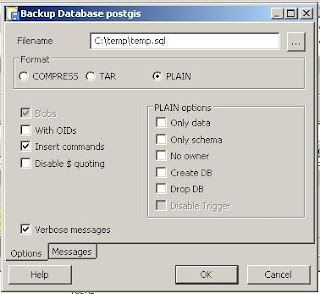
1. Export database from postgres to plain text sql. You should do this with the pgAdmin III tool by right clicking on the db you want to export and choosing "Backup ..." this will take you to the following screen, where you should select options as displayed below (notice the "Plain" and "Insert" options are checked):
2. Once you have exported your plaintext sql you must create tables in mysql into which you can insert your data. Do this by copying the CREATE statement appearing in the "SQL Pane" (after you have clicked/selected a table) in pgAdmin III into the MySQL query line and execute this. Do this for every table you want to import
3. Now run insert statements ... if you get errors, make sure the table structure of the new table is the same as your old table (and insert statement)
1. Export database from postgres to plain text sql. You should do this with the pgAdmin III tool by right clicking on the db you want to export and choosing "Backup ..." this will take you to the following screen, where you should select options as displayed below (notice the "Plain" and "Insert" options are checked):

2. Once you have exported your plaintext sql you must create tables in mysql into which you can insert your data. Do this by copying the CREATE statement appearing in the "SQL Pane" (after you have clicked/selected a table) in pgAdmin III into the MySQL query line and execute this. Do this for every table you want to import
3. Now run insert statements ... if you get errors, make sure the table structure of the new table is the same as your old table (and insert statement)
Tuesday, June 24, 2008
Import/Copy CSV/data to Postgres
I recently was having trouble importing CSV to postgres. The trouble was with empty trailing columns (the first row had an empty trailing column). I found that a tab delimited file (export from excel, using export as ms-dos text) allowed me to avoid warnings about empty columns.
WARNING: nonstandard use of escape in a string literal
This error was followed by a description of where the error was occuring, which was showing the error in the wrong place. To fix this issue, make sure that all slashes (such as in file paths) are "/" rather than "\"
Here is an example of a proper COPY command:
COPY count_crime TO 'c:/temp/temp.csv' USING DELIMITERS ','
Thursday, June 12, 2008
was getting the following error after installing php 5.2.6 on IIS with IIS CGI configuration:
PHP Warning: PHP Startup: Unable to load dynamic library 'C:\Program Files\PHP\ext\php_pgsql.dll' - The specified module could not be found. in Unknown on line 0
I resolved this by replacing the .dll in this location with my .dll from a previous install (php 5.2.5) ... you can probably use the .dll from any version
PHP Warning: PHP Startup: Unable to load dynamic library 'C:\Program Files\PHP\ext\php_pgsql.dll' - The specified module could not be found. in Unknown on line 0
I resolved this by replacing the .dll in this location with my .dll from a previous install (php 5.2.5) ... you can probably use the .dll from any version
Wednesday, June 4, 2008
are you getting field value with with the leading zeros excluded, but are joining to a field with the zeros included? this is a common issue with census tract numbers, for instance.
you can use the vbscript below in arcmap or other vba data programs to generate a six character value with leading zeros, where the value is less than six characters
*remember new field MUST BE TEXT format, else will always loose leading zeros!
parameters:
short_text_field: shortened field which longer field will be based on
need to change the loop condition to the longer number of characters involved (here is 6)
dim txtShort
txtShort = CStr([short_text_field])
Do Until len(txtShort) = 6
txtShort = "0" & txtShort
Loop
you can use the vbscript below in arcmap or other vba data programs to generate a six character value with leading zeros, where the value is less than six characters
*remember new field MUST BE TEXT format, else will always loose leading zeros!
parameters:
short_text_field: shortened field which longer field will be based on
need to change the loop condition to the longer number of characters involved (here is 6)
dim txtShort
txtShort = CStr([short_text_field])
Do Until len(txtShort) = 6
txtShort = "0" & txtShort
Loop
Subscribe to:
Posts (Atom)