Thursday, April 28, 2011

Flipped Polar Coordinate System


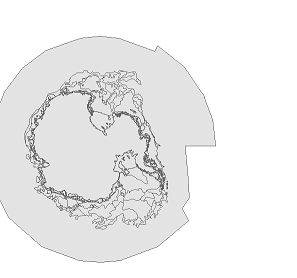
Problem: NIC/NSIDC Antarctica data was appearing flipped 180 dg, without coordinate system or projection defined. When other polar data, thought to be in the same coordinate system/projection was placed with this data, the other data appears to be flipped 180 in the right orientation (though the data in question is still flipped).

Solution: Modify the projection of the data in question to have a central meridian of 180 instead of 0 (with "define projection" using a custom projection based the other data). THE DATA VIEW PROJECTION MUST ALSO BE SET TO THE PROJECTION OF THE "GOOD" DATA (e.g. 0 Meridian, Polar Stereographic)

Saturday, March 26, 2011

On Simple Structure and Factor Analysis

"I had become increasingly unhappy with L. L. Thurstone's principle of so-called simple structure and his widely accepted idea that variables are best explained if based on a minimum number of "factors", on only one "factor" if possible. As far as I can see, varieties in nature are nowhere put on single poles, phenomena generally arise from relations of underlying building blocks, from interaction of components and complex combinations. On all levels of inanimate and animate organization wholes emerge from interweaving parts. I could not understand why factor analysts were doggedly attempting to construe a world of utterly independent "dimensions" and associated constructs in splendid isolation." (David M. Glover)

Monday, March 7, 2011

notepad ++ special characters as replace string

While copy over a newline special character will show up in the "find" field of the "find & replace" dialog if one of these is present in a highlight, these cannot be copied/pasted into the "replace" field notepad ++ allows an extended set of special characters to be used both in the find AND replace fields ... so for example if you replace ";" with ";\r\n", with the "extended" option checked on, you will get a new line after every ";"

Monday, February 14, 2011

ArcGIS Editor for OpenStreetMap

I recently had a chance to test out ArcGIS Editor for OpenStreetMap (1.1 Beta3), an open source toolbox for interacting with OpenStreetMap (OSM). OSM, a popular open-source data repository, gained extra traction in the US after the Haitian Earthquake. This growth came from NGOs, and from some ArcGIS shops with open source leanings, who advocated on behalf of an extension to OSM from ArcGIS. I've been interacting heavily with OSM in building and maintaining the University of Delaware Map (UD Map). The data schema for UD Map is based on the OpenStreetMap schema, and interfaces with OpenStreetMap for data updates and publishing. As the project demanded it, and as a test of the new tools, I used the toolkit to publish some pending campus base layers. Alas, this trial ended disappointingly, leaving only manual editing of the vector layer. Append, which could have been used to join the vector input to the OSM polygon layer, did not work as expected: The OSM changeset was not updated, and therefore could not be uploaded to OSM for processing. The tools still look very useful for doing manual editing of OSM data and adding OSM data as fully editable vector layers in a map ... and of course, as code to be expanded upon ... this story is to be continued :-)

Thursday, February 3, 2011

jquery accordion breaks out of containers on ie7 (ie6?)

fixed this issue by giving css position:relative on parent container further up the tree (in this case was the tabs parent)

Google Spreadsheet Data API

I gave a presentation to the U. of Delaware WebDev group and IT-CS&S (RDMS) on the topic of using data from Google Docs Spreadsheets for consumption in a scripted workflow. I'm using this in the UD Map for automatically incorporate rendering decisions from OCM.

The gist is that you open an https stream with headers for
authorizing, capture an authorization token on the response, open
another stream returning an xml of the table, and parse that. In
addition, you could form the url for the second stream with parameters
that query the column of interest, for example.

Here is the presentation:

Here is some sample code (excuse references to my database/tables):


function do_post_request($url, $data, $optional_headers = null)
{
echo "Begin do_post_request \n";
$params = array('http' => array(
'method' => 'POST',
'content' => $data
));
if ($optional_headers !== null) {
$params['http']['header'] = $optional_headers;
}
$ctx = stream_context_create($params);
$fp = @fopen($url, 'rb', false, $ctx);
if (!$fp) {
throw new Exception("Problem with $url, $php_errormsg");
}
$response = @stream_get_contents($fp);
if ($response === false) {
throw new Exception("Problem reading data from $url, $php_errormsg");
}
return $response;
}

function doFromGoogle(){
echo "Begin doFromGoogle \n";
define("GURL", "https://www.google.com/accounts/ClientLogin");
define("SPREADSHEETREFKEY", "***YOURKEYHERE***");

//creates post to google auth, creates $auth string from google
$dataArr = array();
$dataArr['accountType'] = 'GOOGLE';
$dataArr['Email'] = '***YOUREMAILHERE***';
$dataArr['Passwd'] = '***YOURPASSWORDHERE***';
$dataArr['service'] = 'wise'; //name for spreadsheet data service
$dataArr['source'] = '***YOURSORUCENAMEHERE***'; //this may be optional

$dataStr = http_build_query($dataArr);

$opt_headers = 'application/x-www-form-urlencoded';

$responseStr = do_post_request(GURL, $dataStr, $opt_headers);
$responseArr = explode("\n",$responseStr); //breaking apart request to get auth token
$auth = explode("=", $responseArr[2]);
$auth = $auth[1];

$authStr = 'Authorization: GoogleLogin auth=' . $auth;
$url = 'https://spreadsheets.google.com/feeds/list/' . SPREADSHEETREFKEY . '/1/private/full';


$opts = array(
'http'=>array(
'method'=>"GET",
'header'=>"$authStr"
)
);

$context = stream_context_create($opts);

// ini_set('Authorization', "$authStr");

$handle = fopen($url, "r", false, $context);
$contents = stream_get_contents($handle);
fclose($handle);

$xml = new SimpleXMLElement($contents);

$fullquery = null;


$count = 0;
foreach ($xml->entry as $entry){
$count = $count + 1;
$id = $entry->children('http://schemas.google.com/spreadsheets/2006/extended')->osmid;
$render = $entry->children('http://schemas.google.com/spreadsheets/2006/extended')->dorender;
$label = $entry->children('http://schemas.google.com/spreadsheets/2006/extended')->dolabel;
$labelname = $entry->children('http://schemas.google.com/spreadsheets/2006/extended')->labelname;
$maxzoom = $entry->children('http://schemas.google.com/spreadsheets/2006/extended')->maxzoom;
$minzoom = $entry->children('http://schemas.google.com/spreadsheets/2006/extended')->minzoom;
$labelname = addslashes ($labelname);

//$color = $entry->children('http://schemas.google.com/spreadsheets/2006/extended')->color;

//print "$id, $count \n $render \n $label \n $labelname";
print "$id $maxzoom $minzoom\n";

$query = null;

if($render <> ''){
$query .= "UPDATE master SET dorender = '" . $render . "' where osm_id = $id and dorender <> '" . $render ."';\n";
}
if($label <> ''){
$query .= "UPDATE master SET dolabel = '" . $label . "'where osm_id = $id and dolabel <> '" . $label ."';\n";
}
if($labelname <> ''){
$query .= "UPDATE master SET labelname = '" . $labelname . "'where osm_id = $id and labelname <> '" . $labelname ."';\n\n";
}
if($maxzoom <> ''){
$query .= "UPDATE master SET maxzoom = '" . $maxzoom . "'where osm_id = $id;\n\n";
}
if($minzoom <> ''){
$query .= "UPDATE master SET minzoom = '" . $minzoom . "'where osm_id = $id;\n\n";
}

$fullquery .= $query;
}

//print($query);
$result = pg_query($fullquery) or die('Query failed: ' . pg_last_error());
}


Thursday, January 13, 2011

Replacing Tomcat .jsp pages with Apache httpd .php pages

It turned out that this task was much easier than I'd expected. Here are the steps I took:

  1. Edit the httpd.conf file (default path: C:\Apache2.2\conf\httpd.conf). Remove tomcat references to the services (JkMount). Add Redirect 301 lines to .php proxy
  2. Create php proxy which is referenced by Redirect 301. Arguments are passed by the redirect, which can be handled by this proxy. Here is the code I used for a single argument, but could easily be extended to other arguments. This also saves arguments that are not handled to a log file:
    $out = array();
    $log = '';

    foreach($_GET as $key => $value){
    if (strpos($key, 'max')){};
    switch ($key) {
    case bldgcode:
    $out['id'] = $value;
    break;
    default:
    $log .= 'key is ' . $key . ' and value is ' . $value . "\n";
    break;
    }

    }

    $fp = fopen('log', 'a');
    fwrite($fp, $log);
    fclose($fp);

    $url = 'http://maps.rdms.udel.edu/map/index.php?' . http_build_query($out);

    header("Location: $url");